

UX CASE STUDY
Overview
Vireo is a CRM rebuilt around the capabilities the old tool did not have: a contact record that cannot be duplicated, a lifecycle that reflects how work actually arrives, an estimate engine that produces the real commercial document, targets that can be measured, and a mailbox that stays in step with the pipeline.
It is not a Pipedrive clone. Its pipeline is document-driven — Brief, Proposal, Quotation, PO, Invoice — and its value is in connecting commercial documents to revenue accountability.
My role
Owner of the Vireo blueprint: business requirements, UX structure, user flows, technical design and the delivery roadmap — and I single-handedly vibe coded the whole software end to end, designing and building it solo with AI-assisted coding.
The problem
Sales work ran on documents that lived outside the CRM. An estimate was prepared in a spreadsheet, sent from a personal mailbox, and its number typed back into a free-text field. The CRM knew an estimate existed, but not what was on it, what it was worth, or whether it was accepted.
The same fracture repeated for targets, kept in a separate spreadsheet reconciled by hand, and for contacts, which arrived from imports, lead conversion and manual entry with nothing preventing the same person being created three times. Pipeline value was unreliable, nobody could see how a rep was tracking against target without a manual export, and outreach reached the same contact from two owners.
Research: auditing what exists
The existing app was a working deal tracker covering roughly a third of a commercial CRM. The audit separated what really worked — the kanban with drag-and-drop, activities with a calendar view, lead capture and conversion, attachments, labels and notifications — from what only looked finished: reports drawn from hardcoded arrays, a mock automation list, a global search box with no handler, and team and collaborator screens filled with dummy rows.
The plan was also checked against Pipedrive’s help-centre navigation, category by category, to find anything dropped by accident rather than on purpose. That surfaced one true gap: custom fields, which a customizable filter system depends on.
Process
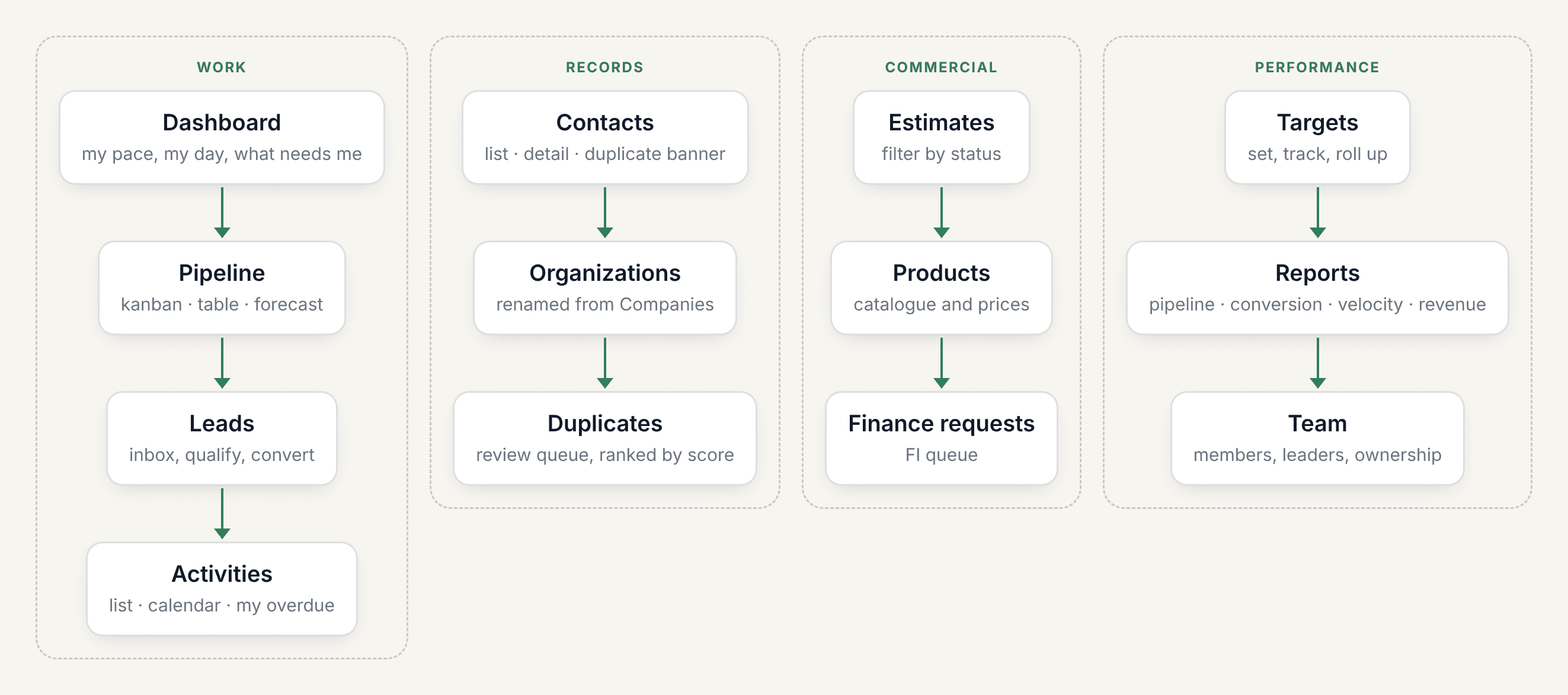
Information architecture: the navigation had ten flat items, two of which led to fabricated data. The new structure groups by what a rep actually does in a day — work the pipeline, keep records clean, meet a number — into four groups: Work, Records, Commercial and Performance.
Screen inventory: every screen is defined by its primary job, from a dashboard that answers “am I on track and what needs me today” to an estimate editor, an import wizard and a duplicates queue.
User flows: six flows carry what prose cannot — where a duplicate is stopped, how an estimate drives the pipeline, how a revision preserves history, how synced mail finds the right deal, how a target number is derived, and how visibility is decided on every read.
Key design decisions
Warn at the point of creation. Duplicate detection appears inside the create form, under the field that triggered it — never as a modal after saving.
Destructive actions are reversible. Merge, import and stage change write audit rows and offer an undo window.
Optimistic, then reconciled. Drag-and-drop, status changes and inline edits apply instantly and roll back visibly on failure.
Pace, not percentage. Wherever a target appears, the headline number is attainment relative to time elapsed.
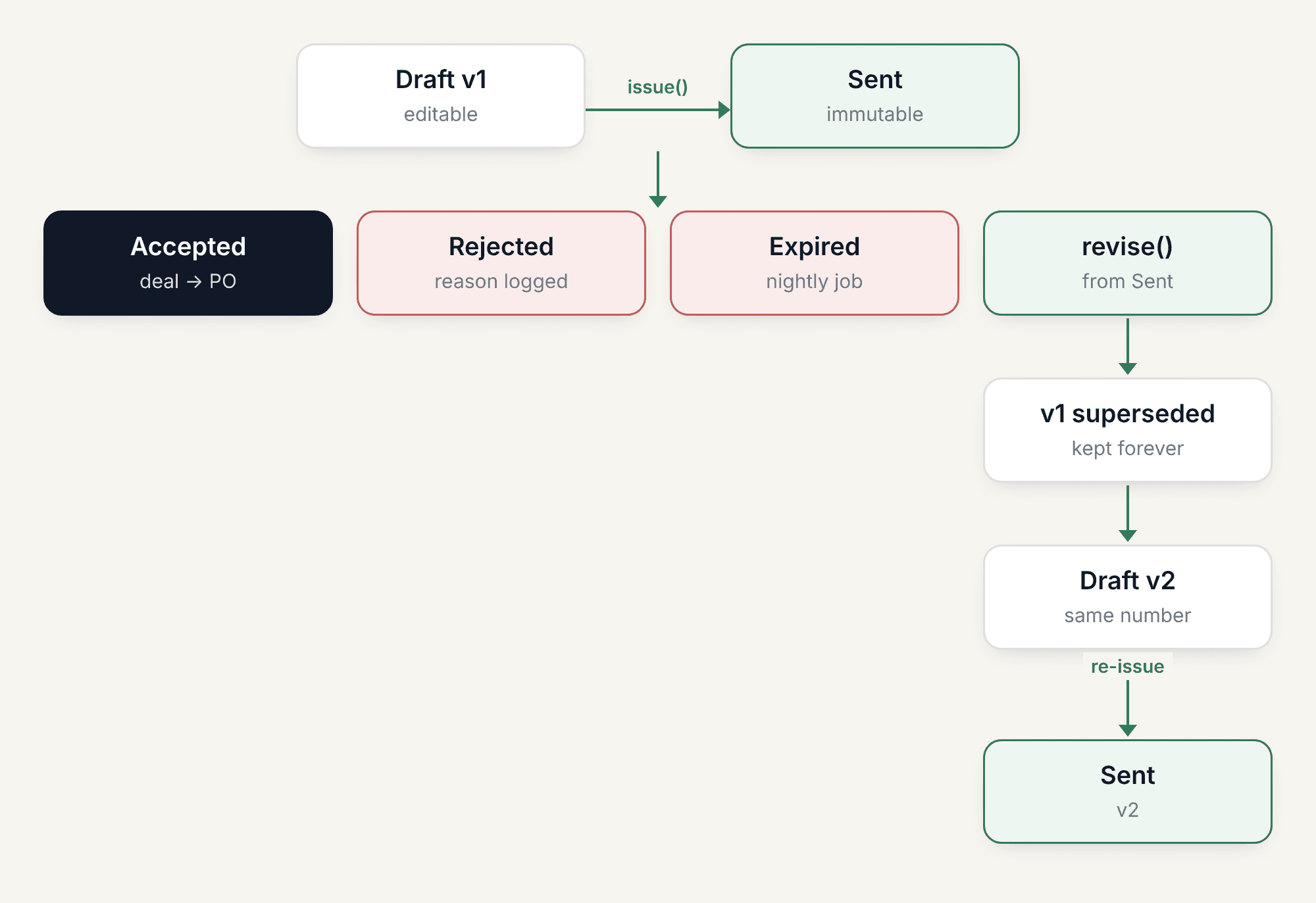
Immutability is visible. A sent estimate renders as a document, not a form; Edit is replaced by Revise.
Four states, always. Every list and panel specifies loading, empty, error and populated. No bare spinners.
Leads become a lifecycle stage, not a table. Cold, Lead and Active are stages of one contact, and logging the first activity promotes a contact automatically.
Copy names the outcome. Send estimate, then “Estimate sent” — not “Submit” and “Success”. Errors state cause and remedy, in business vocabulary rather than schema vocabulary.
Where it stands
The blueprint is a draft for approval, with a delivery roadmap of 25 weeks for two engineers.
USER FLOWS
Six mechanisms the prose cannot carry: where a duplicate is stopped, how an estimate drives the pipeline, how a revision preserves history, how synced mail finds the right deal, how a target number is derived, and how visibility is decided on every single read.
Information architecture
The rebuilt structure groups by what a rep actually does in a day: work the pipeline, keep records clean, meet a number.
A document-driven pipeline
Brief, Proposal, Quotation, PO, Invoice — connecting commercial documents to revenue accountability.

Creating a contact without creating a duplicate
Three filters of decreasing strength, and only the last one is a guarantee.

How visibility is decided on every read
The tenant check is a gate; everything after it is a disjunction.

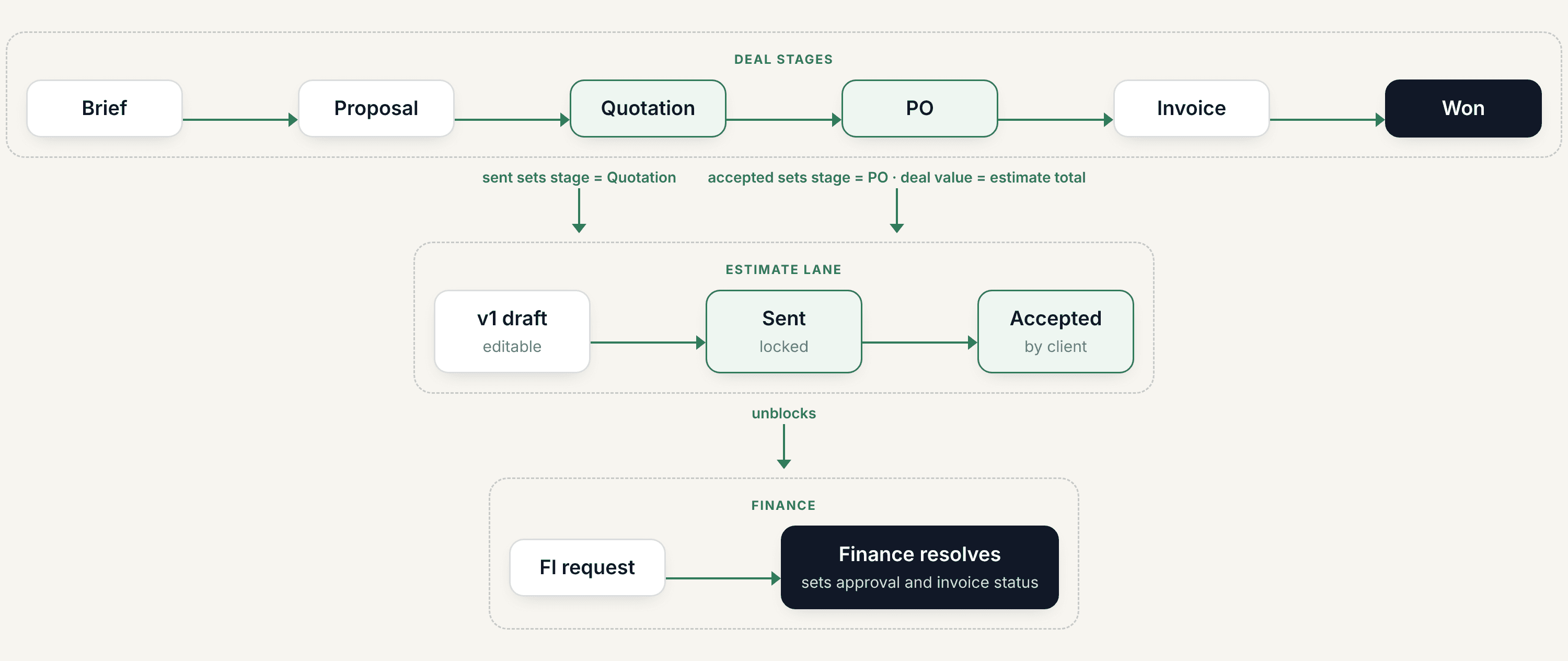
How an estimate drives the pipeline
The estimate is the thing that moves the deal, not the other way round.
Revising an estimate that has already been sent
One action, two atomic effects: revise() never mutates a sent document — it forks.
How a target number is derived
Attainment is computed on read, which is why stage history is a prerequisite rather than a nice-to-have.

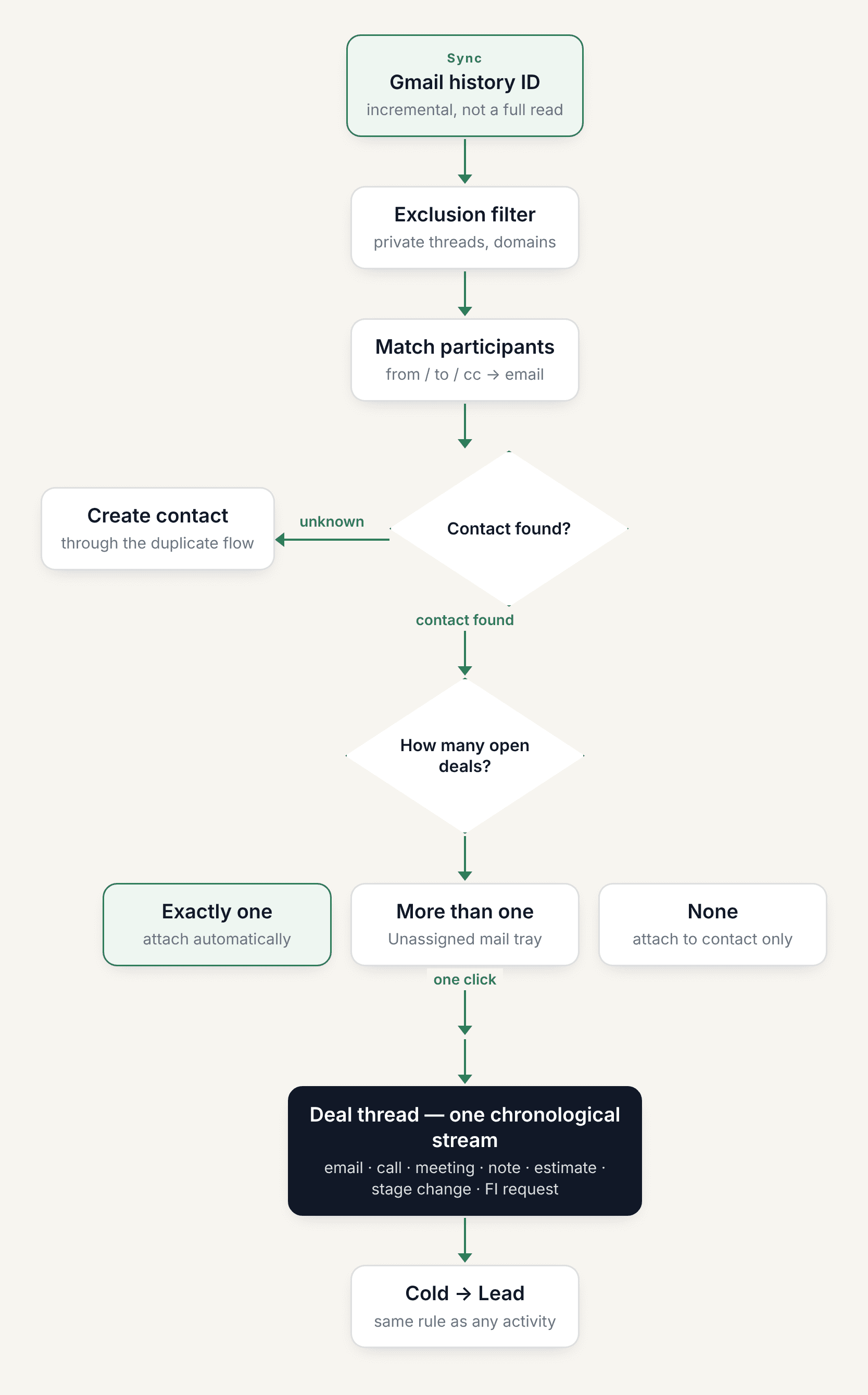
Gmail sync and how mail reaches the right deal
The ambiguity case is the whole design: attach only when there is exactly one candidate.

Dashboard

Pipeline

Deal detail

Inbox

Contacts

Targets

Reports
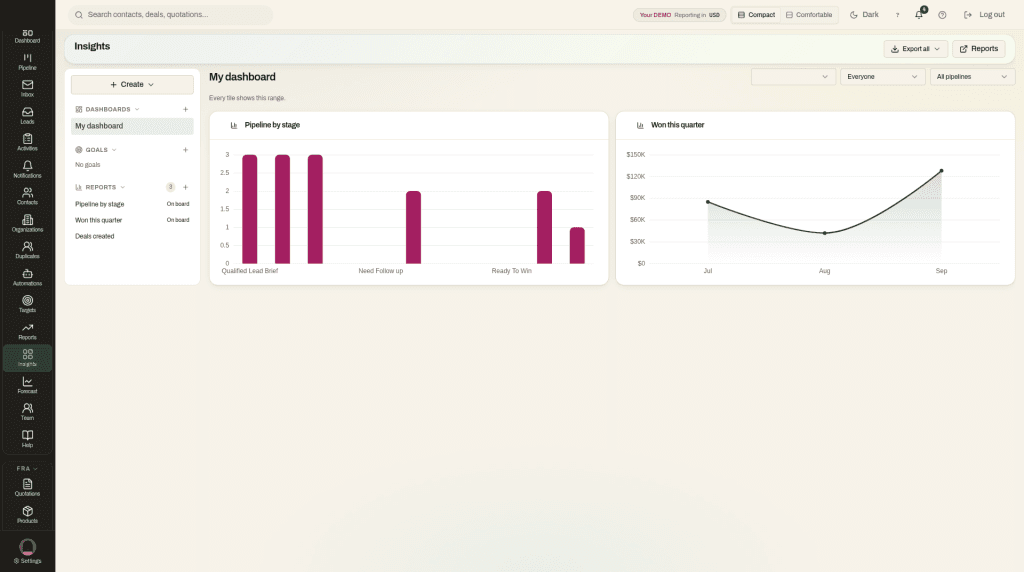
Insights

Forecast

Quotation detail
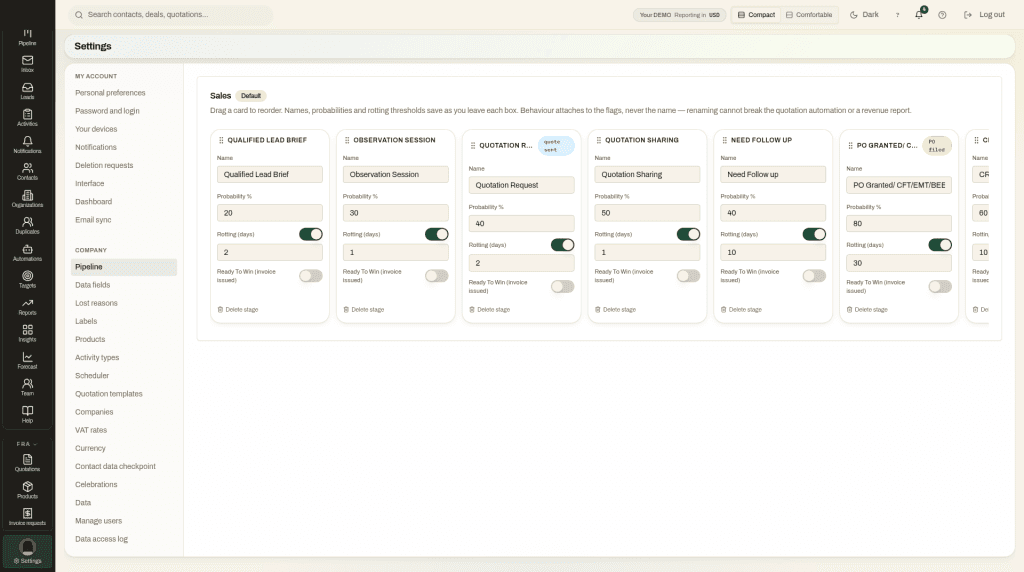
Pipeline settings

Login
Get it on Gumroad